
Proxmox Backup Server
Backup server: a thirty-day backup calendar per machine, failed tasks with their logs, scheduled jobs (sync, verify, prune, garbage collection), datastores, disks and ZFS pools, pending updates, the services and package versions of the server itself, and the tape tier when there is one.
Network ports to open
Section titled “Network ports to open”From the DumbMonit server (or its relay agent) to the device:
| Port | Protocol | Purpose |
|---|---|---|
| 8007 | TCP | API (HTTPS, default) |
The monitor page
Section titled “The monitor page”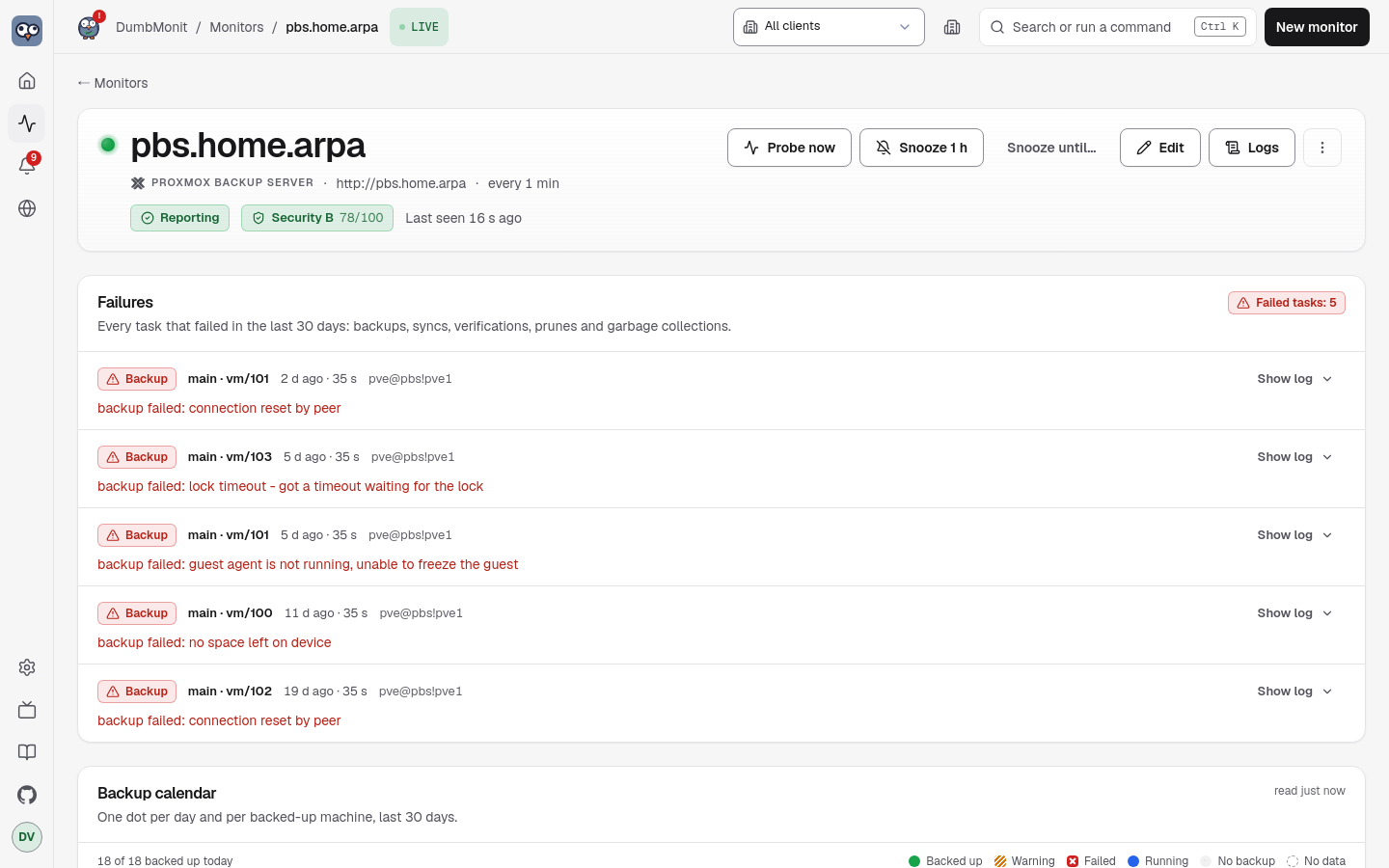
Beyond the generic charts, a PBS monitor shows six panels, read from what the probe stored — opening the page never queries PBS itself:
- Failures — every task that failed in the last 30 days (backup, sync,
verify, prune, GC), newest first, with its type, what it targeted, when it
started and PBS’s own error message. Show log fetches the last lines of
the task log from PBS on demand (
/nodes/localhost/tasks/{upid}/log). - Backup calendar — one row per backed-up machine (datastore, namespace,
type/id, and the guest name when PVE wrote it in the snapshot notes), one dot per day: teal when a backup succeeded that day (a task endedOK, or a snapshot exists — synced groups have no local task), red when a backup task failed and none succeeded, amber when the backup is there but its verification failed, blue while one is running, grey when nothing happened. Each dot’s tooltip gives the time, size, duration and error excerpt; the row says when the last success and the last failure were, the snapshot count, the size of the latest snapshot and the retention of the prune job that applies. A machine whose backups all fail has no snapshot at all and still appears — from its tasks. - Jobs — each sync, verify and prune job and the GC of each datastore, with schedule, last run, outcome, next run; a failed last run gets a red plate and the error text, failures sort first.
- Tape — only when the server has a tape tier. Tape backup jobs with their pool, drive, the label of the next tape expected, the last run and its error; media pools with their allocation and retention policies, how many tapes they hold, how many have expired and whether they are encrypted; drives and changers; and the tapes themselves with their status, media set, location and bytes written.
- Datastores and disks — usage bar, PBS’s own fill-up forecast,
deduplication factor, last GC; ZFS pools with their health; physical disks
with the SMART verdict and SSD wear, and the full SMART table on demand
(
/nodes/localhost/disks/smart). Per datastore it also shows a maintenance or “Not mounted” plate, a “Busy: n writes, n reads” plate, the growth measured per day and over how many days of history, how many machines of each type it holds, how long the last GC took, and a warning line when that GC found unreadable chunks. - Server — the systemd units, with the ones the server cannot do without called out; the Proxmox package versions (installed, available, running), with a “Restart pending” plate when the daemon is behind its package; the certificate and its expiry; and the traffic-control rules with their caps and what they are carrying.
The calendar splits days at the browser’s local midnight. Its history comes
from the task list: the first probe after a start reads the last 30 days
(/nodes/localhost/tasks?since=…&limit=5000), later probes only the task
window, and the server keeps the union in SQLite (pbs_task_history, 35 days,
at most 10 000 tasks per monitor) so the calendar survives restarts.
What it watches
Section titled “What it watches”All metrics are prefixed dumbmonit_pbs_.
| Family | Metrics | Labels |
|---|---|---|
| Node | node_cpu_percent, node_cpu_count, node_iowait_percent (CPU time waiting on I/O — on a backup server this is what says the disks are saturated), node_load1/5/15, node_memory_used/total/free_bytes, node_memory_used_percent, node_swap_used/total_bytes, node_rootfs_used/total/avail_bytes, node_rootfs_percent, node_uptime_seconds, node_kernel_info, version_info | |
| Datastores | datastore_available, datastore_bytes_used/total/avail, datastore_used_percent, datastore_estimated_full_seconds (PBS’s own estimate; absent while it lacks data or usage is decreasing), datastore_dedup_factor, datastore_removable_unmounted (1 when a removable datastore is notmounted — not an error, it is simply not plugged in; label mount_status), datastore_backend_info (label backend, filesystem or s3), datastore_maintenance (1 when the datastore is held for maintenance; label mode, offline, read-only…), datastore_groups and datastore_snapshots (label type, vm/ct/host/other), datastore_active_reads, datastore_active_writes (what is holding the datastore right now — this is what explains a garbage collection that will not finish), datastore_growth_percent_per_day, datastore_growth_bytes_per_day, datastore_history_days | datastore |
| Garbage collection | gc_last_removed_bytes, gc_last_pending_bytes, gc_last_run_ok (PBS 3.3+), gc_last_success_age_seconds, gc_last_duration_seconds, gc_disk_chunks, gc_last_pending_chunks, gc_last_removed_chunks, gc_bad_chunks (chunks the GC found unreadable and left in place — corruption, not space to reclaim: a backup that references them can no longer be restored), verify_last_success_age_seconds, sync_last_success_age_seconds | datastore |
| Backup groups | backup_count, backup_last_timestamp_seconds, backup_last_age_seconds, backup_last_size_bytes, backup_last_verified (1 verified, 0 failed, absent if never verified) | datastore, namespace, backup_type, group |
| Namespaces | namespace_groups, namespace_snapshots (root namespace is namespace="") | datastore, namespace |
| Tasks in the window | tasks_running, tasks_ok, tasks_failed | worktype (backup, verificationjob, garbage_collection, prune, syncjob…) |
| Jobs | job_enabled, job_last_ok (1 for OK or WARNINGS: n, 0 otherwise, absent if the job never ran), job_never_run (1 when a job is enabled, has a schedule and has never run — it has neither a failure nor a success, so it is invisible everywhere else), job_last_run_age_seconds, job_next_run_seconds (negative when overdue), sync_jobs_total, verify_jobs_total, prune_jobs_total; alias sync_job_last_ok for the rule | job, datastore, kind (sync, verify, prune); remote (remote:remote-store, or local) on sync jobs — the alias carries job, datastore, remote |
Tape (option tape, off by default, five calls) | tape_backup_job_last_ok, tape_backup_job_never_run, tape_backup_job_last_run_age_seconds, tape_backup_job_next_run_seconds, tape_backup_jobs_total; tape_drive_info (presence series), tape_drives_total, tape_changers_total, tape_media_pools_total; tape_media_total, tape_media_writable, tape_media_expired, tape_media_bytes_used | job, datastore, pool, drive on the jobs; drive, vendor, model, changer on tape_drive_info; pool on the media counts |
| Disks (same names as Proxmox VE) | node_disk_size_bytes, node_disk_smart_failed (0 passed, 1 failed; absent when SMART gave no verdict), node_disk_health_info (presence series; labels health, serial, used), node_disk_wearout_percent (endurance used, SSD only, as PBS displays it: 100 − wearout) | disk (/dev/sda), model, type |
| ZFS pools (same names as Proxmox VE) | node_zfs_pool_degraded (0 ONLINE, 1 otherwise), node_zfs_pool_health_info (label health), node_zfs_pool_size_bytes, node_zfs_pool_alloc_bytes, node_zfs_pool_free_bytes, node_zfs_pool_used_percent, node_zfs_pool_fragmentation_percent | pool |
| Updates | node_updates_pending (number of packages with an update available) | |
Versions (option updates, from /nodes/localhost/apt/versions) | node_package_upgradable (1/0), node_package_info (presence series; labels installed, available, running), node_running_version_stale (1 when the installed proxmox-backup-server package is no longer the daemon that is running — the package was upgraded, the services were not restarted) | package, restricted to proxmox-backup, proxmox-backup-server, proxmox-backup-client, proxmox-kernel-helper |
Services (option services, one call) | node_service_active (1 running, 0 not), node_service_enabled (absent for a static unit, which another unit pulls in and which is therefore neither enabled nor disabled), node_services_total | service, expected ("1" for proxmox-backup, proxmox-backup-proxy and proxmox-backup-banner, the units the server cannot do without; every other unit still gets its series, with expected="0", and never raises an alert) |
Certificate (option certificates, off by default) | node_certificate_expires_seconds, negative once expired | certificate (the file name), issuer |
Traffic control (option traffic_control) | traffic_rate_in_bytes, traffic_rate_out_bytes (measured at the instant of the probe), traffic_limit_in_bytes, traffic_limit_out_bytes (the configured cap, parsed from PBS’s decimal strings like 100 MB; absent when that direction is uncapped, rather than a zero that would read as “everything is blocked”), traffic_rules_total | rule |
| Skipped options | feature_skipped_info: 1 while an optional call is refused (403) for lack of a privilege, absent otherwise. The monitor page shows it as a discreet note naming the privilege; it is neither a probe error nor an alert | feature, privilege |
| Limits and collection | backup_groups_total, backup_groups_dropped, up, scrape_errors, scrape_duration_seconds |
A task that ends in WARNINGS: n counts as successful. Calls per datastore are
limited to four in parallel: listing snapshots reads the datastore’s indexes,
and a burst would slow down the backup in progress.
The job lists are not limited to the task window: a sync job that has been
failing for three weeks is still reported as failing. A job that never ran has
no job_last_ok series, but it does get job_never_run, and the “PBS job
never ran” rule fires on exactly that case.
Garbage collection is read with a single /admin/gc call covering every
datastore at once, where it took one /admin/datastore/{store}/gc per
datastore before; that per-datastore call remains as a fallback when
/admin/gc is unavailable — an older PBS, or a missing privilege — and is not
counted as an error. /admin/gc also carries the run duration and the chunk
counters the per-datastore call does not. gc_last_run_ok comes from
last-run-state on PBS 3.3 and later; on older versions it falls back to the
most recent garbage collection task of the window. The per-type counts come
from /admin/datastore/{store}/status?verbose=1: without verbose, PBS
returns only the sizes, which /status/datastore-usage already gave.
/admin/datastore/{store}/namespace returns the whole namespace tree, so
nothing is lost in sub-namespaces — pve/site-a/rack1 is counted like the
root. Disks and pools come from /nodes/localhost/disks/list and
/nodes/localhost/disks/zfs (option disks; a 403 is tolerated, and so is
the 400 a server without ZFS answers: no pool series, no scrape error).
datastore_growth_percent_per_day is a least-squares fit over the usage
history PBS itself returns with /status/datastore-usage: a usage fraction
between 0 and 1, one point every thirty minutes over the last month, with
null holes that are skipped rather than filled — a server that was off did
not grow while it was off. These are the same numbers behind PBS’s own “full
in N days” forecast. At least eight measured points are needed before anything
is published, and datastore_history_days says how much history the slope
covers. A negative value is not a fault: pruning is reclaiming more than the
backups add.
Nothing at all is published for tape when the server has no drive, no changer, no pool and no tape job — an installation without tape must not grow a dozen zero series that read like a tape tier in trouble. A tape that belongs to no pool, blank media or media retired from a pool, is in no pool count.
Devices
Section titled “Devices”Every backed-up machine — host, VM or container — is also published under the
generic family shared by every DumbMonit integration that tracks protected
devices — dumbmonit_client_device_*, prefixed without pbs, documented in
full under Client devices. Nothing new
is asked of PBS: it is the same last-snapshot date already behind
backup_last_timestamp_seconds, republished under the shared family so that
one rule and one table serve PBS alongside every other integration that
protects a device.
| Metric | What | Labels |
|---|---|---|
last_backup_timestamp_seconds | Same instant as backup_last_timestamp_seconds for that group | device, type, os, user, kind |
stale_seconds | Positive once a group has gone past device_stale_days (3 by default) without a new snapshot; drives the Client device stale rule | device, type, os, user, kind, signal (always backup) |
Limit worth knowing: PBS does not record a separate “connection” for a
backed-up machine, only backups — last_seen_timestamp_seconds and the
connection signal are never published here; a device shows last_connection
as ”—” on the monitor page’s table. The device named in the alert is the guest
name from the snapshot notes when PVE wrote one, otherwise type/id, same as
the backup calendar.
Built-in rules that apply: Monitor unreachable, PBS datastore almost full, PBS datastore filling up, PBS backup too old (per backup group: no new snapshot for two days — edit the rule’s threshold for a longer window), PBS backup verification failed, PBS task failed, PBS garbage collection too old, PBS garbage collection failed, PBS corrupt chunks found, PBS sync job failed, PBS prune job failed, PBS verification job failed, PBS job never ran, PBS datastore not mounted, PBS service down, PBS restart pending after upgrade, PBS certificate expiring, PBS tape backup failed, PBS disk SMART failure, PBS SSD worn out, PBS ZFS pool degraded, PBS updates pending, Client device stale. Notifications name the job, datastore or backup group concerned.
What to prepare in PBS
Section titled “What to prepare in PBS”-
Open Configuration → Access Control → User Management → Add, enter the user name dumbmonit, choose the realm Proxmox Backup authentication server, then click Add.
dumbmonit@pbs -
Open Configuration → Access Control → API Token → Add: user dumbmonit@pbs, token name monitor. Copy the Token ID and the Secret now, the secret is shown only once.
dumbmonit@pbs!monitor -
Open Configuration → Access Control → Permissions → Add → User Permission: path /, user dumbmonit@pbs, role Audit.
-
Add a second permission with Add → API Token Permission: path /, token dumbmonit@pbs!monitor, role Audit. A token has its own permissions, so both are needed.
-
Optional, to see pull sync jobs and the tape tier: repeat both permissions with role RemoteAudit on path /remote and role TapeAudit on path /tape.
-
In DumbMonit, enter the server address (for example pbs.lan:8007), the Token ID and the Secret.
Required permissions
Section titled “Required permissions”- Audit on /: Read-only: datastores, snapshots, tasks, node status
- RemoteAudit on /remote (optional): Shows the sync jobs that pull from a remote
- TapeAudit on /tape (optional): Reads the tape tier
- Sys.Modify on /system/certificates (optional): Only for the certificate expiry option
Vendor documentation: PBS API tokens
Why these permissions
Section titled “Why these permissions”Do not reuse the account you log in with: a leaked token would then manage
every backup. The Audit role can only read.
AuditisSys.AuditplusDatastore.Audit. On/it reads the datastores, snapshots, verify and prune jobs and GC, the node status, the task list and task logs, the services, the traffic-control rules, the disks and ZFS pools, and the pending package updates. Nothing here can write: the collector only performsGETs.- A token’s effective privileges are the intersection of its own ACL and its user’s. Granted to the token alone, they amount to nothing at all, and PBS reports that nowhere. Every permission is therefore added twice, once for the user and once for the token.
RemoteAuditon/remote(Remote.Audit) shows the sync jobs that pull from a remote: the built-inAuditrole does not coverRemote.Audit, and without it such a job is not refused, it is simply absent from the job list.TapeAuditon/tape(Tape.Audit) reads the tape tier. Without them those items are silently skipped, nothing else changes.- PBS uses a self-signed certificate by default: if the connection is refused for that reason, tick “Accept an unverifiable certificate” in the options.
To check what the token can actually read, run this on the backup server (Administration → Shell). It prints the effective privileges, path by path; an empty result means the user is missing the permission the token has — the case where the device looks perfectly alive and reports nothing.
proxmox-backup-manager user permissions 'dumbmonit@pbs!monitor'Prefer a shell for the whole setup?
proxmox-backup-manager user create dumbmonit@pbs --comment "DumbMonit monitoring"proxmox-backup-manager user generate-token dumbmonit@pbs monitorproxmox-backup-manager acl update / Audit --auth-id 'dumbmonit@pbs'proxmox-backup-manager acl update / Audit --auth-id 'dumbmonit@pbs!monitor'proxmox-backup-manager acl update /remote RemoteAudit --auth-id 'dumbmonit@pbs'proxmox-backup-manager acl update /remote RemoteAudit --auth-id 'dumbmonit@pbs!monitor'proxmox-backup-manager acl update /tape TapeAudit --auth-id 'dumbmonit@pbs'proxmox-backup-manager acl update /tape TapeAudit --auth-id 'dumbmonit@pbs!monitor'Credentials
Section titled “Credentials”| Credential | Fields |
|---|---|
| API token (recommended) | Token ID: user, realm and token name as PBS shows them, dumbmonit@pbs!monitor. Secret: the UUID shown once when the token was created. DumbMonit sends them as the PBSAPIToken=user@pbs!name:secret header PBS expects. |
| Username / password | user@pbs (or @pam) and the password. A ticket is obtained, cached and renewed ten minutes before its two-hour expiry. |
The API accepts the token in two pieces (token_id + secret) or, as older
versions did, as one string token = user@pbs!name=secret; both are stored
the same way. A whole token pasted into Token ID is split by the form.
Rights, read-only, and granted twice: a token’s effective privileges are the
intersection of its own ACL and its user’s, so each role below has to be given
to dumbmonit@pbs as well as to dumbmonit@pbs!monitor. Simplest: the
built-in Audit role on /, plus RemoteAudit on /remote for sync jobs
and TapeAudit on /tape for the tape tier — Audit covers Sys.Audit and
Datastore.Audit only, and those two roles exist precisely because it does
not. Per endpoint:
| Endpoint | Needs |
|---|---|
GET /version | any authenticated user |
GET /nodes/localhost/status, GET /nodes/localhost/tasks, GET /nodes/localhost/tasks/{upid}/log | Sys.Audit on /system (Audit on /system) |
GET /nodes/localhost/disks/list, …/disks/smart, …/disks/zfs | Sys.Audit on /system (Audit on /system); a 403 is tolerated: no disk series, no scrape error. …/disks/zfs answers 400 on a server without ZFS, tolerated the same way |
GET /nodes/localhost/services, GET /admin/traffic-control | Sys.Audit on /system (Audit on /system); a 403 is tolerated: no series, no scrape error |
GET /nodes/localhost/certificates/info | Sys.Modify on /system — a write privilege, which is why the certificates option is off by default and why a monitoring token is not expected to have it |
GET /status/datastore-usage, GET /admin/gc, GET /config/datastore, GET /admin/datastore/{store}/gc, …/status, …/active-operations, …/namespace, …/snapshots | Datastore.Audit on /datastore/{store} (DatastoreAudit on /datastore) |
GET /admin/verify, GET /admin/prune | listed for the datastores where the token has Datastore.Audit; other jobs are silently omitted |
GET /admin/sync | Datastore.Audit on the datastore and Remote.Audit on /remote/{remote} (RemoteAudit on /remote); other jobs are silently omitted |
GET /nodes/localhost/apt/update, …/apt/versions | Sys.Audit on / (Audit on /); a 403 is tolerated: no update or version series, no scrape error |
GET /tape/backup, /tape/drive, /tape/changer, /config/media-pool, /tape/media/list | Tape.Audit on /tape (TapeAudit on /tape); every failure is tolerated, a PBS without tape support included: no tape series, no scrape error |
Note that Audit on /system alone does not cover the update list, which PBS
checks at the root path. A 403 on the job lists or the update list is treated
as an optional privilege: nothing is produced and nothing is counted in
scrape_errors. And a role missing on the user is worse than a 403: the
call succeeds and returns an empty list, so nothing is produced and nothing
complains either.
Address: 10.0.0.20, pbs.lan, pbs.lan:8007, [fd00::2] or a full URL.
The https scheme and port 8007 are added if missing.
Options
Section titled “Options”| Key | Label | Default | Help |
|---|---|---|---|
port | API port | 8007 | Used if the address does not give a port. |
insecure_tls | Accept an unverifiable certificate | false | Proxmox Backup Server ships with a self-signed certificate by default: enable this if the connection is refused for that reason. |
request_timeout_seconds | Timeout per request (seconds) | 15 | Time allowed for each API call, from 1 to 120. Listing the snapshots of a large datastore can take several seconds. |
task_lookback_hours | Task window (hours) | 24 | Older tasks are not counted among the failures, from 1 to 8760. |
datastores | Monitored datastores | (empty) | Names of the datastores to monitor, separated by commas. Empty: every datastore. |
max_groups | Backup group limit | 500 | Maximum number of backed-up machines producing series; beyond it, the oldest are ignored. From 1 to 100000. |
jobs | Watch scheduled jobs | true | Lists the sync, verify and prune jobs and their last run (/admin/sync, /admin/verify, /admin/prune). |
updates | Watch pending updates | true | Counts the packages with an update available (/nodes/localhost/apt/update). |
disks | Watch disks and ZFS pools | true | Reads the physical disks (SMART verdict, SSD wear) and the ZFS pools (/nodes/localhost/disks). |
services | Watch the server’s services | true | Reads the systemd units and reports whether the ones the server cannot do without are running. Needs Sys.Audit on /system; silently skipped otherwise. |
datastore_details | Read datastore detail | true | Two more calls per datastore: how many machines and snapshots it holds, what is reading or writing it right now, and whether it is held for maintenance. |
traffic_control | Watch traffic limits | true | Reads the rate limits and what they are carrying right now. Needs Sys.Audit; silently skipped otherwise. |
certificates | Watch certificate expiry | false | Off by default: PBS guards this one call behind Sys.Modify, a write privilege a monitoring token should not be given. |
tape | Watch tape backups | false | Reads the tape tier. Off by default, since most installations have no tape hardware. Needs Tape.Audit on /tape. |
device_stale_days | Device staleness (days) | 3 | A backed-up machine with no new snapshot for longer than this is reported stale. From 1 to 90. |
Common errors
Section titled “Common errors”| Symptom | Likely cause |
|---|---|
| Certificate error | Self-signed certificate: install a trusted one (ACME is built into PBS) or enable insecure_tls. |
| Authentication error | Secret pasted into Token ID (or the other way round), or the token has no Audit permission — most often because the role was granted to the token but not to the user that owns it, which does not fail: the calls succeed and return empty lists. Only GET /version failing condemns the whole probe; any other call failing is counted in scrape_errors. |
| Everything reads empty but the monitor is up | The user is missing the ACL the token has, and PBS intersects the two: proxmox-backup-manager user permissions 'dumbmonit@pbs!monitor' prints nothing. Grant every role to dumbmonit@pbs as well. |
No node_updates_pending series | The token lacks Sys.Audit on /: give it the Audit role on /, or set updates to false to stop asking. |
| A sync job is missing | The token lacks Remote.Audit on the job’s remote: add the RemoteAudit role on /remote. The job is not refused, it is simply absent from the list. |
| No certificate expiry | The certificates option is off, which is the default: PBS requires Sys.Modify for that call, a write privilege. |
| The Tape panel never appears | The tape option is off, which is the default, or the server has no drive, changer, pool or tape job. Nothing is published when there is nothing. |
| No growth figure on a datastore | PBS’s usage history has fewer than eight measured points; it fills over the first days. |
| “PBS datastore filling up” never fires | datastore_estimated_full_seconds is computed by PBS from a month of measurements and is absent until then. |
| Missing groups | More than max_groups backed-up machines: backup_groups_dropped says how many were left out. |
| The calendar is empty or short | It fills from the task list at the first probe after a start (last 30 days); a PBS whose task archive was cleaned shows only what remains. A machine that was never backed up to this server and never had a task has no row. |
A machine shows as vm/104 without its name | PVE writes the guest name in the snapshot notes only with the default notes template ({{guestname}}); a custom template or an older PVE leaves the notes empty. |
| “Show log” fails | The token lacks Sys.Audit on /system for the task log, or PBS already rotated the log of an old task. |